Sogiry
Client
Sogiry.com
Role
- Product Designer
- Frontend Engineer
- System Architect
Category
B2B SaaS / Automation
Year
2023-Present
Sogiry is a robust B2B repricing automation platform built for e-commerce power users. It tackles the intersection of UX, trust, and complex business rules, allowing store managers and key stakeholders managing thousands of SKUs to maintain competitive pricing without destroying profit margins.
Challenge
Make repricing automation trustworthy enough for e-commerce teams managing thousands of SKUs and real margin risk.
My Role
Founder, product designer, frontend engineer, and system architect across dashboard UX, pricing logic, and data workflows.
Key Decisions
- Replaced black-box automation with auditable decision traces and margin evidence.
- Paired granular rule configuration with live previews before activation.
- Pivoted from self-serve onboarding to a high-touch setup model after learning buyers wanted more trust-building friction.
Outcome
Early adopters reduced pricing-management time by 75%, with a 0% critical error rate from margin guardrails.
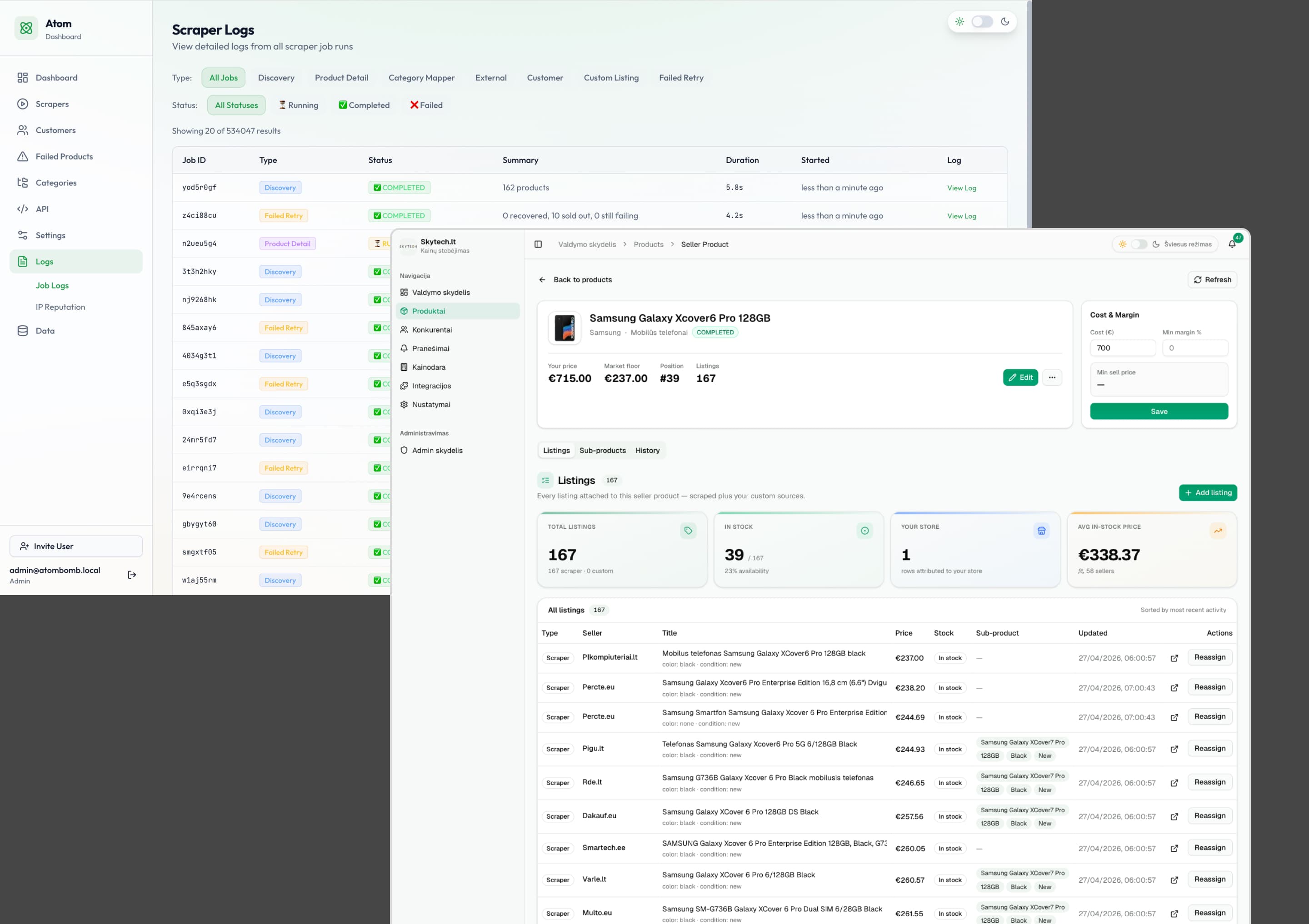
A complex web of competitor listings, market floors, and scraper logs that store managers must navigate.
The Problem Space
High Risk, High Cognitive Load.
In high-volume e-commerce retail, a single pricing mistake can cost thousands of euros in minutes. Store managers were trying to manage dynamic pricing across vast catalogs and multiple sales channels using sprawling, fragile spreadsheets.
The cognitive load of monitoring competitor data manually resulted in a highly error-prone workflow that choked retail scalability and directly threatened profit margins.
Discovery & Research
Stakeholders Don't Trust Black-Box AI.
Before writing a single line of code, I conducted deep-dive interviews with e-commerce store managers, pricing analysts, and executive stakeholders. The resounding feedback was fear. They had all been burned by automated tools that aggressively dropped prices based on flawed competitor data.
I used AI to rapidly synthesize transcripts, identifying 'Fear of the Black Box' as the #1 barrier to adoption. Stakeholders wanted automation, but they demanded transparency and control over the execution.
Mapping these pain points into an affinity diagram revealed that giving users visibility into the algorithm's decisions was just as important as the algorithm itself.
"I want automation to save me time, but if I can't see why it changed a price, I'm turning it off. One bad price drop can wipe out a week of profit."
The Messy Middle
Iterating Away from 'Set-and-Forget'.
My initial hypothesis was that users wanted full 'set-and-forget' automation to save time. Early wireframes and testing quickly disproved this.
Store managers felt they were losing control over their pricing strategy. I pivoted away from full automation to a 'human-in-the-loop' approach, introducing semi-automatic modes and strict approval workflows.
Design Strategy
Building the UX of Trust.
The core design principle for Sogiry became 'Trust through Transparency.' Automation is only usable when the stakeholder trusts it enough to turn it on.
I achieved this by ensuring every automated decision was auditable. The Executive Dashboard isn't meant to be decorative; it is a tactical triage center designed to answer three critical questions immediately: Where am I losing margin? Where am I uncompetitive? What should I do next?
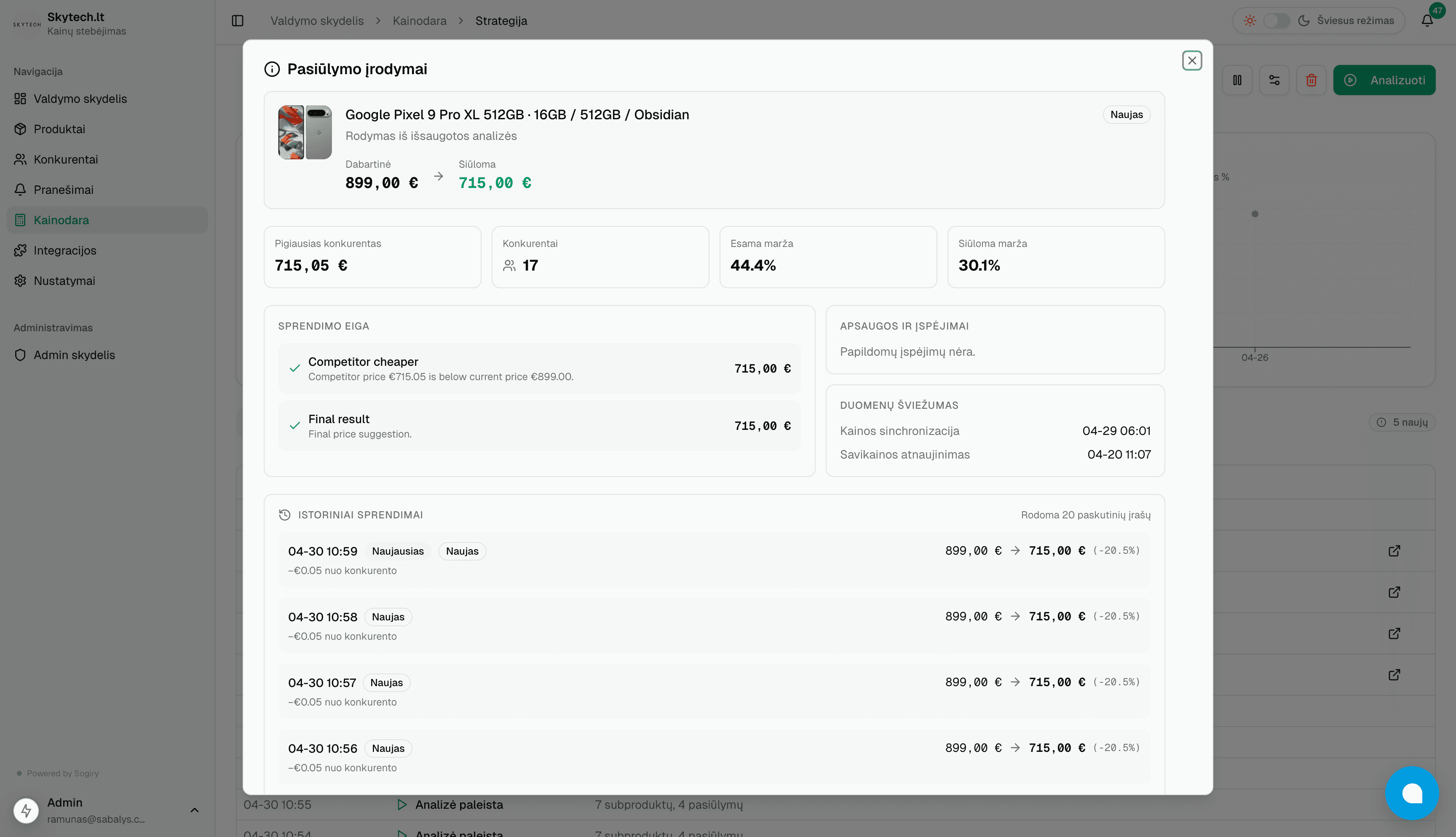
Proving the decision with evidence: The dialog displays the margin impact and a clear, timestamped decision trace.
Interactive Strategy Creator
Building Confidence with Live Previews.
Setting up automated pricing rules can be intimidating if users cannot anticipate the outcome. To solve this, I designed a strategy creator that pairs granular rule configuration with a real-time live preview. This ensures that users always know exactly how their pricing decisions will behave in the wild before ever clicking 'activate'.
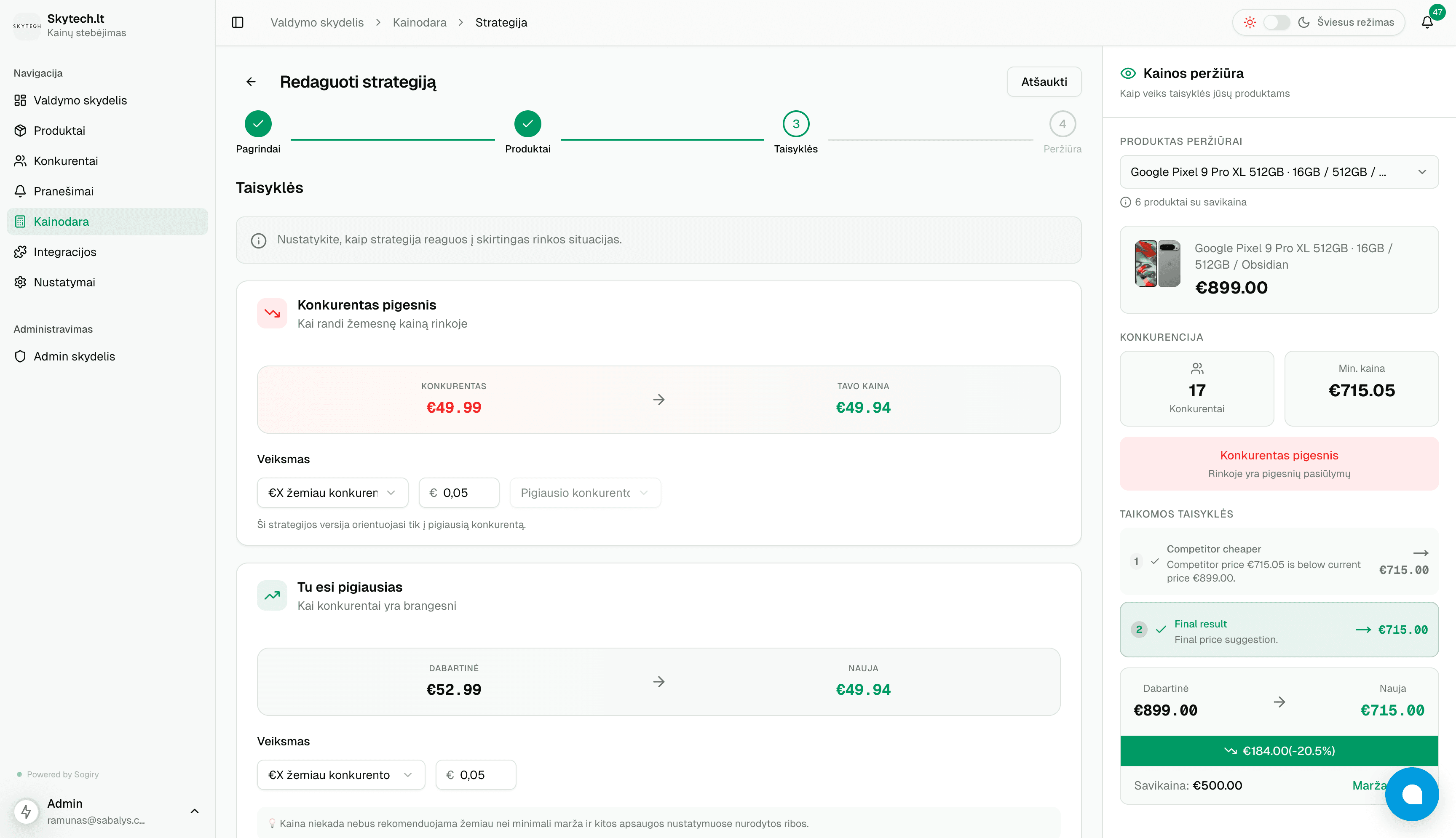
Contextual Rule Blocks
Users configure specific logic for scenarios like 'Competitor is cheaper' using natural, human-readable constraints.
Real-Time Sandbox
A live preview pane instantly tests the draft strategy against real inventory data, calculating margins and final prices before activation.
Step-by-Step Wizard
Breaks down complex automation into a clear, linear flow, significantly reducing cognitive load.
Historical Market Context
A Time Machine for Pricing Data.
Pricing is highly dynamic, but business decisions often require hindsight. Store owners needed a reliable way to audit past pricing changes and understand exactly what the competitive landscape looked like on any given day.
I designed the Snapshot Timeline to allow users to 'go back in time' for any single product. By visualizing historical market floors, competitor stock levels, and exact listings on specific dates, managers can confidently analyze past trends, justify strategic shifts, and make data-backed decisions based on hard historical evidence.
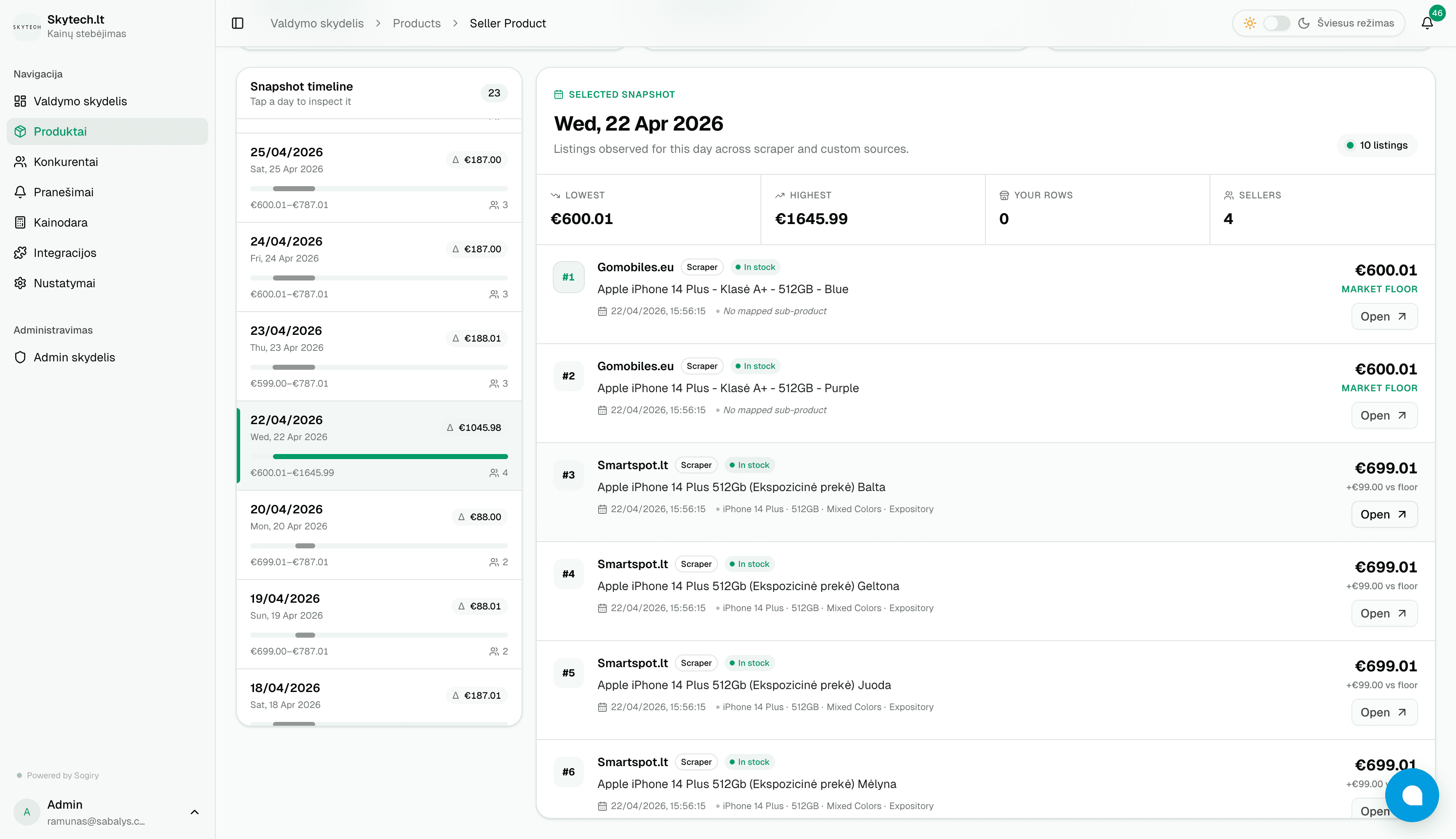
The Snapshot feature allows users to inspect the exact state of the market for a product on any historical date.
Daily Market Intelligence
Turning Noise into Actionable Insights.
Tracking thousands of SKUs daily creates a massive amount of noise. The challenge was distilling this data into a digestible format that allows store managers to instantly understand macro market movements.
I designed the Daily Market Overview to highlight extreme market shifts at a glance. Instead of digging through rows of data, managers immediately see if a specific competitor has started aggressively discounting, or if there's a sudden trend of price increases across the market. This allows them to proactively adjust their strategies rather than simply reacting to individual product changes.
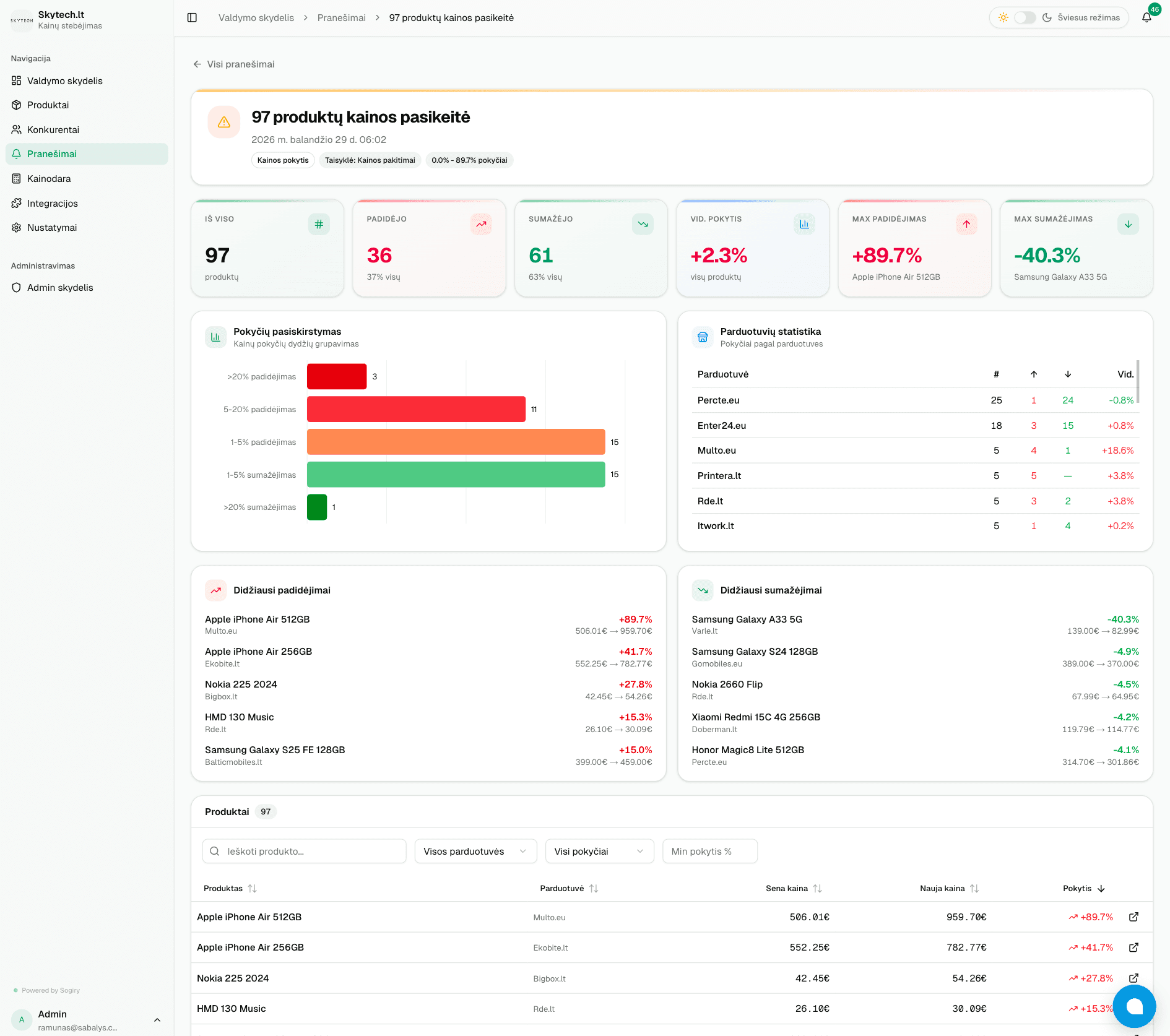
The Daily Market Overview highlights the largest price drops, competitor trends, and overall market distribution.
Micro-Ergonomics
Designing for the Spreadsheet Veteran.
Enterprise users migrating from Excel demand speed and safety. To ensure the UI matched their existing workflows, I focused on high-density ergonomics at the micro-level:
• Keyboard-First Triage: Allowing analysts to navigate data tables and approve or reject pricing suggestions via keystrokes instead of endless mouse clicks.
• 'Blast Radius' Guardrails: Bulk actions instantly calculate and display the estimated financial impact before execution, preventing catastrophic user errors.
• Accessible Data Visualization: Critical margin warnings use distinct iconography and high-contrast typography—never relying on color alone—to reduce eye strain and accommodate colorblindness.
Outcomes & Impact
The Power User Philosophy.
Pros don't want 'simple'—they want 'efficient.' Every unnecessary click in a multi-channel workflow multiplies by a hundred. By delivering a 'glass-box' system, I successfully mapped and simplified complex pricing strategies.
• Reduced time spent managing pricing adjustments by 75% for early adopters.
• Achieved a 0% critical error rate on automated repricing thanks to the margin guardrail system.
• Successfully onboarded key enterprise retail partners within the first quarter of launch.
Learnings & Next Steps
Mistakes Made and the Path Forward.
Looking back, there are two major areas where I made missteps that are currently being addressed:
1. UX Over UI: In the initial build, my focus was entirely on UX over UI. For a tool this critical, customers care far more about the engine not breaking their business than having a perfectly polished interface. I intentionally shipped functional but raw visuals to test the mechanics and break things early. Now that the core UX is validated, the entire platform is undergoing a comprehensive UI and design system overhaul.
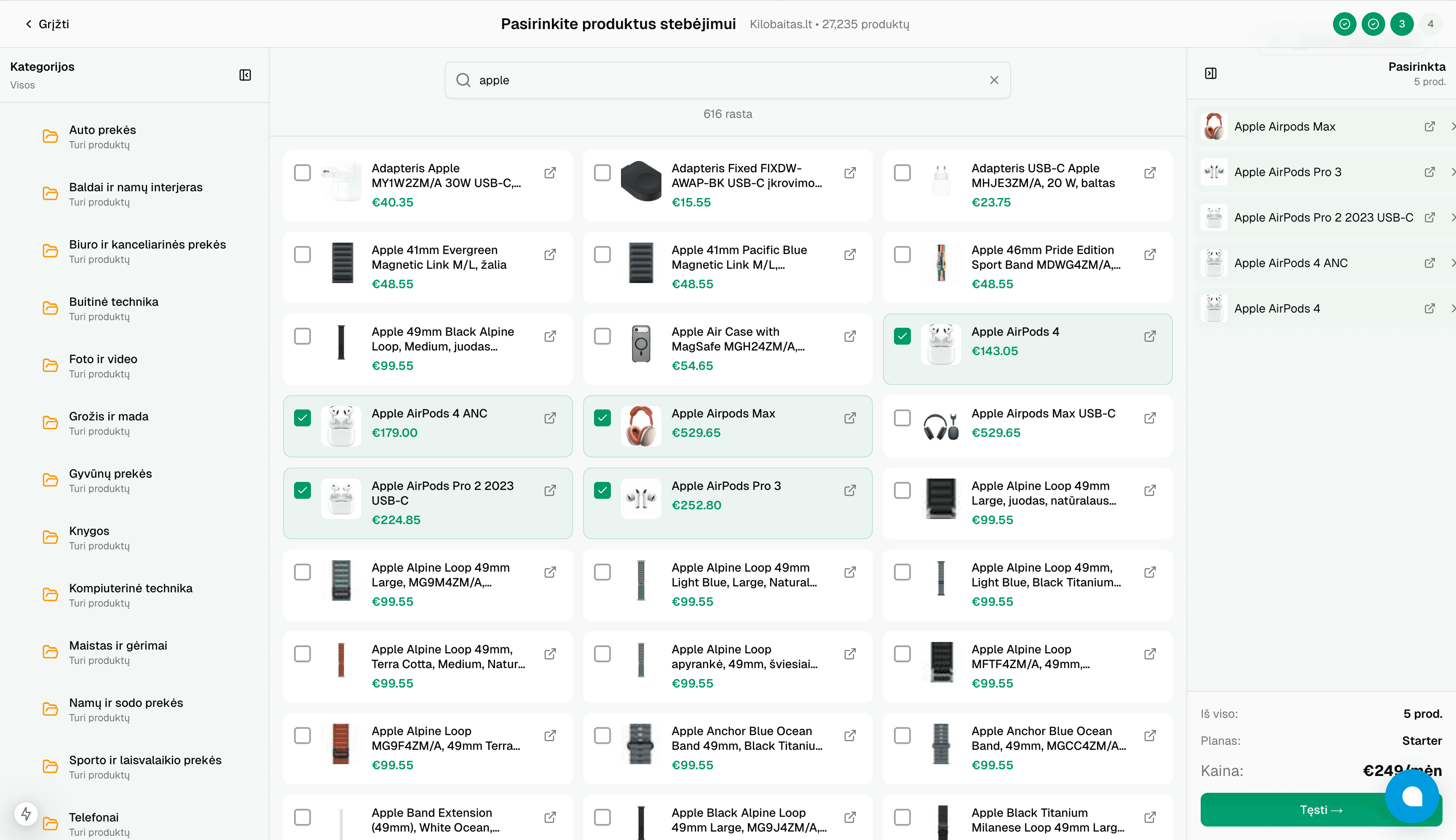
2. The Frictionless Onboarding Trap: I initially assumed the best onboarding was the easiest one. I spent time building a complex self-serve UI allowing users to easily search, filter, and select products to track on our system. My mistake was not doing enough research on enterprise buying psychology. For a tool with this much financial impact, store owners actually want friction. They want to speak with the people behind the software, understand the mechanics, and build trust before handing over control. We abandoned this self-serve flow and pivoted to a high-touch, concierge onboarding model where we set up the store for them.
The abandoned self-serve onboarding UI. A costly lesson in building complex features before validating the core enterprise buying behavior.
Up Next